Your VR app, live on the big screen.
Quest Viewer receives live video from Meta Quest headsets running your Unity application and displays it on a Windows PC — sub-100 ms over your own network, peer-to-peer, with no capture card and no cloud service. One headset or a whole room of them, side by side.
Built for demos, QA and instructor-led training. Works with VR applications built using the free Quest Streaming SDK — it cannot capture other Quest apps or system screens.
Free forever for one headset at 720p. No account required to try it.
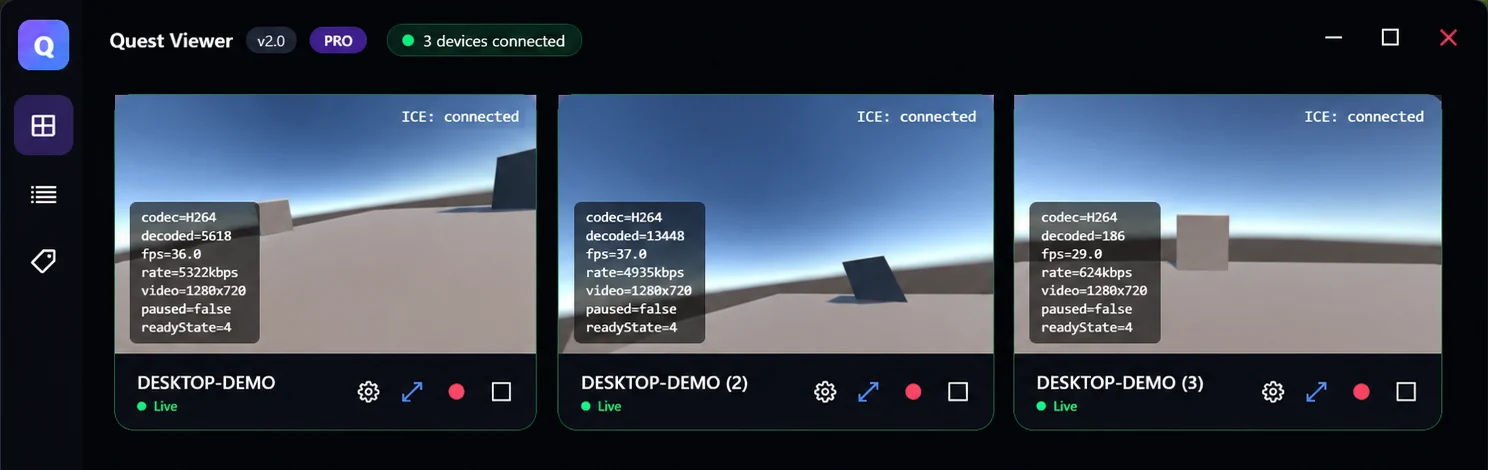
Three headsets streaming at once, with live codec, frame rate and bitrate per tile. Tiles stay in place when a headset drops, and reconnect on their own.
What it does
One Unity package in your VR app, one application on the PC. Everything else is automatic.
Real-time video and audio
Hardware H.264/HEVC encoding on the headset and Opus audio, carried by WebRTC. Typically well under 100 ms on a local network.
Zero-configuration discovery
Put the headset on the same Wi-Fi and it appears on the PC. No IP addresses, no pairing codes, no router changes.
Many headsets at once
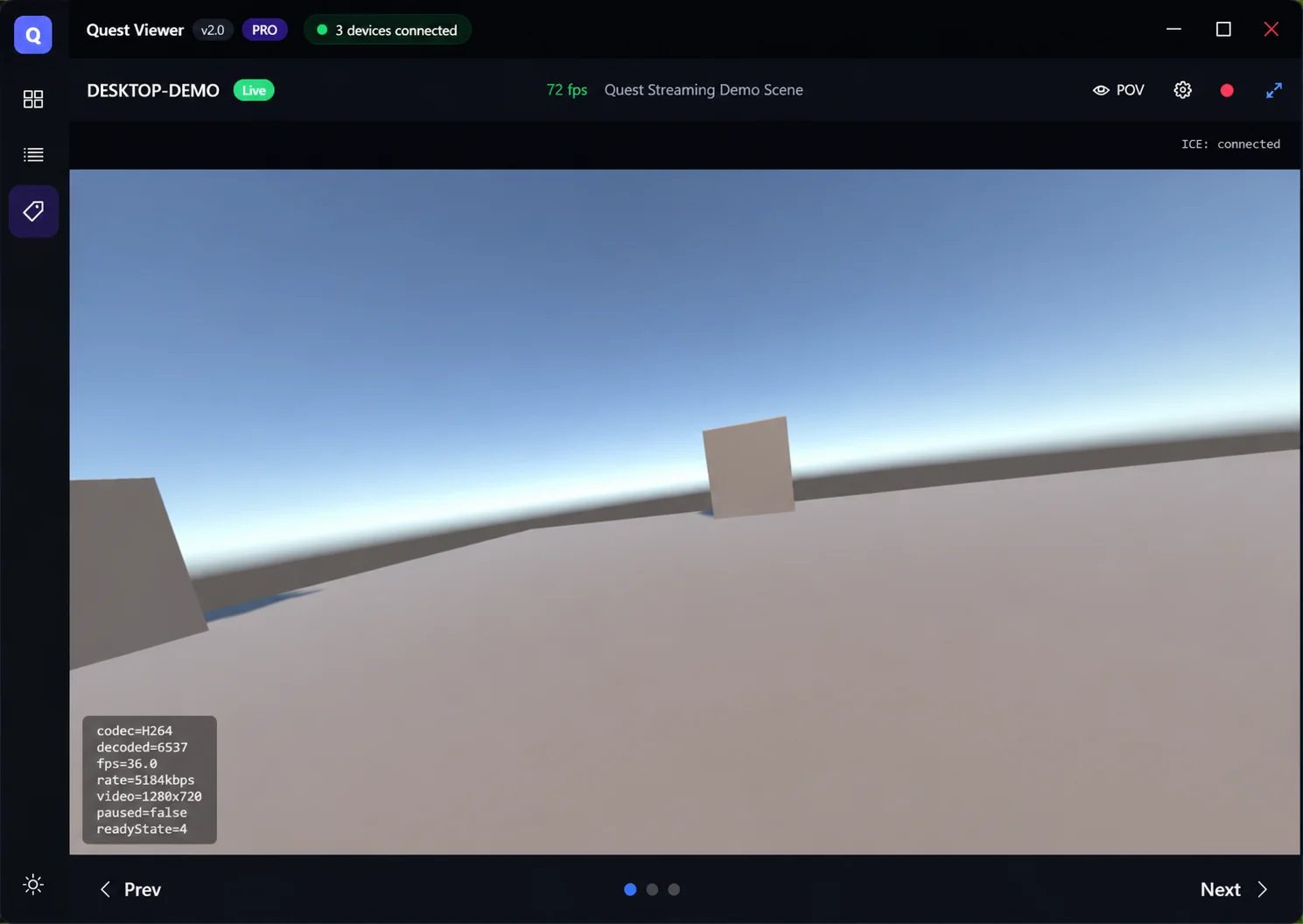
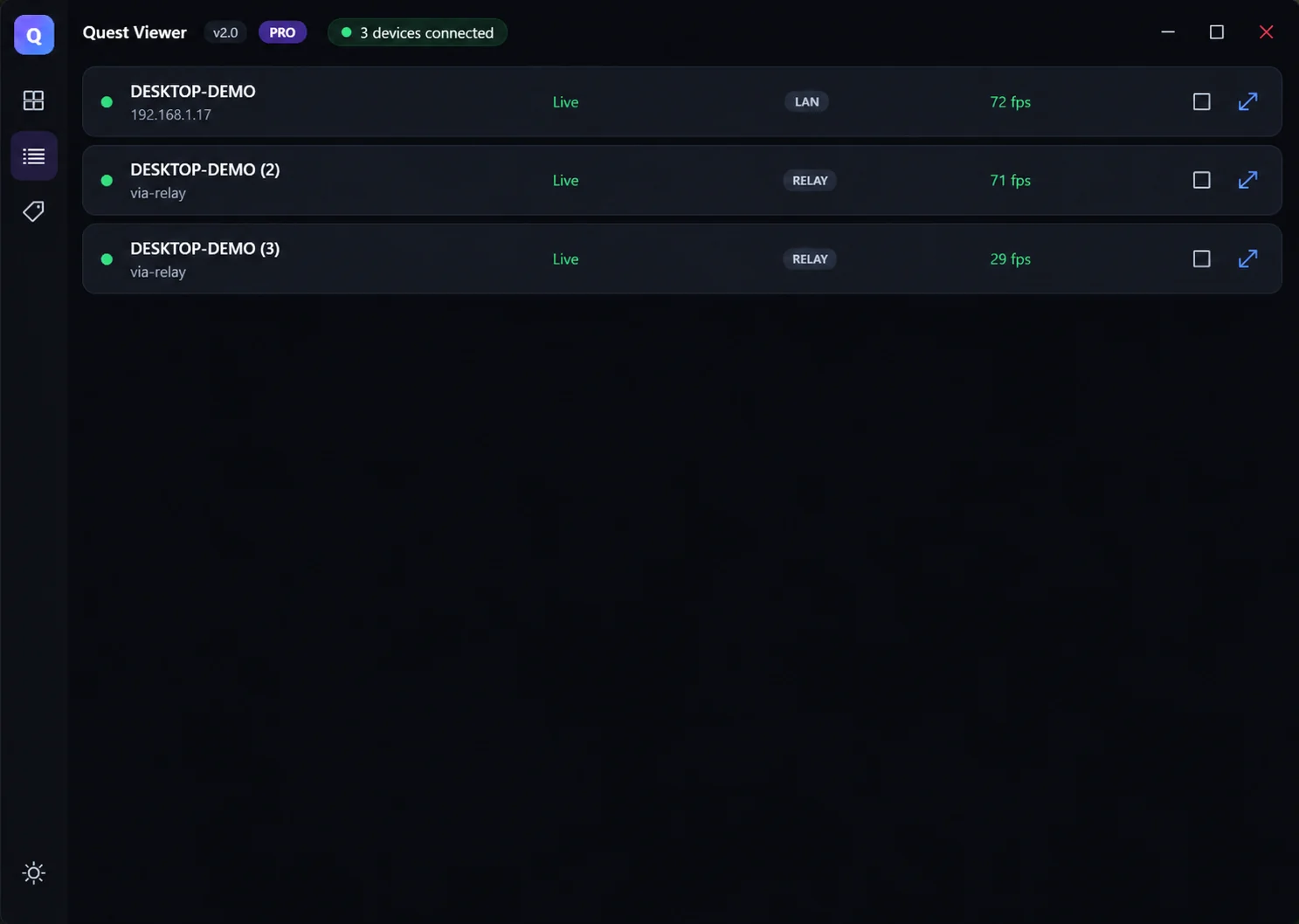
Watch a whole room in a tile grid or a compact list, then click any one to go fullscreen. Tested against a ten-headset target.
Spectator cameras
Stream the player's own view, or any camera in your scene — a third-person chase cam, a fixed stage camera — and switch between them live.
Quality control from the PC
Change resolution, frame rate and bitrate from the receiver while the stream is running. The headset applies it without dropping the session.
Sessions that heal themselves
Headset sleeps, loses tracking or steps outside the guardian? The stream picks itself back up. No restarting the app on either end.
Kind to the headset
Capture renders only while somebody is actually watching, so idle headsets stay cool and hold their charge.
Your footage stays yours
Video travels directly from headset to PC. It never passes through our servers, because we do not run any.
How it works
Only discovery uses the network's broadcast or an optional relay. The video itself goes straight from the headset to your PC — that is what keeps latency low and footage private.
Add the SDK
Import the free Quest Streaming SDK into your Unity project. A setup wizard checks your Android and OpenXR settings and fixes what is wrong.
Build and run
Deploy your app to the headset as usual. Streaming rides along inside it — there is no second app for users to launch.
Open the receiver
Run Quest Viewer on your Windows PC. Every headset on the network running your app shows up as a tile.
Click and watch
Pick a tile for fullscreen, switch cameras, change quality, or record the session to a file.
Pricing
The Unity SDK is free with full source, always. The Windows receiver is free for one headset at 720p — enough to develop, test and ship. Paid licences lift the limits for studios and venues. Prices in US dollars; local taxes are calculated at checkout.
- One headset at a time
- Up to 720p
- Fullscreen, tile and list views
- Community support
- Unlimited simultaneous headsets
- Full resolution, up to 4K-ready
- Session recording
- 3 machine activations
- Updates and email support
- Everything in Pro
- 10 machine activations
- Priority support
- For arcades, LBE and training floors
| Licence | Machines | Term | Price (USD) |
|---|---|---|---|
| Pro — 1 year | 3 | 12 months | $150 |
| Pro — 2 years | 3 | 24 months | $250 |
| Pro — lifetime | 3 | Perpetual | $499 |
| Organization — annual | 10 | 12 months | $799 |
| Organization — lifetime | 10 | Perpetual | $1,099 |
A licence key arrives by email immediately after purchase. Paste it into the app to activate this PC; you can deactivate a PC at any time to free the slot for another. When a subscription lapses the version you already installed keeps working — renewal only covers new releases.
Online checkout is being set up. Prices above are final. To buy a licence today, email gowthambaskaran.xr@gmail.com and we will invoice you directly and issue your key. Self-service checkout returns shortly.
Prices exclude local sales tax, VAT or GST, which is added at checkout. Purchases are covered by our Terms of Service, a 14-day refund policy and our Privacy Policy.
The Unity SDK is free
Quest Streaming SDK is published on the Unity Asset Store with complete C# source.
No activation, no phone-home, no runtime fee — embed it in commercial projects freely.
Requires Unity 6000.0 or newer and com.unity.webrtc 3.0.0+, which the package offers
to install for you on import.
Import the .unitypackage into Unity 6000.0 or newer — the setup
wizard installs com.unity.webrtc and configures your scene. Complete C# source,
no activation check, embeddable in commercial projects at no cost.
The package is also awaiting publication on the Unity Asset Store. Until it appears there, the download above is the same package, at the same version.
Get Quest Viewer
Windows 10 version 1809 or newer, 64-bit. The free tier needs no key and no account — install, run, put a headset on. Get it from the Microsoft Store and it stays up to date automatically.
Free forever for one headset at 720p. Signed and distributed by Microsoft, so there are no security warnings to click through, and updates arrive on their own.
Microsoft Store is the easy route — signed by Microsoft, no security warnings, and it updates itself.
Portable build for managed machines where the Store is blocked
— arcades, training floors, locked-down classrooms. Unzip anywhere and run
QuestViewer.exe, keeping the folder contents together. Windows will warn that it
is unsigned; choose More info → Run anyway. A SHA-256 checksum is published
on the releases page.
Support, refunds and terms
User manual
The full user manual covers installation, streaming and stream quality, recording, licence activation and moving a licence between computers, and a troubleshooting list that answers most questions faster than we can.
Contact
Email gowthambaskaran.xr@gmail.com. We answer within two business days, usually much sooner. Quest Viewer is built and sold by Gowtham, a sole proprietorship registered in Salem, Tamil Nadu, India.
Refund policy
If Quest Viewer does not work for you, write to us within 14 days of purchase and we will refund you in full — no questionnaire, no restocking fee. We would rather fix the problem, so tell us what went wrong and give us a chance first, but the refund is yours either way.
- Refunds return to the original payment method, typically within 5–10 business days.
- The licence key is deactivated when the refund is issued.
- Because the free tier lets you evaluate the software on your own hardware before paying, we ask that you try it first.
Licence terms
Summary below. The full Terms of Service is the agreement that applies to your purchase.
- A Pro licence may be activated on up to 3 computers; an Organization licence on up to 10. You may deactivate a computer at any time and move the activation elsewhere.
- The licence is for your use or your organisation's. Reselling, sublicensing or redistributing the software or your key is not permitted.
- Subscription licences include updates and support for their term. When a term ends, the version you installed continues to work; only newer releases require a current licence.
- The Unity SDK is licensed separately under the Unity Asset Store EULA and may be embedded in your own applications at no cost.
- The software is provided as is, without warranty. Our liability is limited to the amount you paid.
Privacy
- Your video never reaches us. Streams travel directly between the headset and your PC. We operate no media servers and cannot see, store or record what you stream.
- When you activate a licence, the app sends the key and an anonymous machine identifier to our payment provider so it can count activations. Nothing else leaves your computer.
- Purchases are processed by Lemon Squeezy, which acts as merchant of record and handles your payment details and tax. We never see your card number.
- We keep your email address and purchase record so we can support you and honour refunds. Ask us and we will delete it.
- No analytics, no tracking, no advertising, ever.